Transports
Overview
A Simulation Transport specifies how data-exchange between Models is facilitated by a simulation environment. Each transport has its own specific properties and the selection of a transport will be determined by the planned operational deployment of a simulation.
| Transport | Latency | Status |
|---|---|---|
| Loopback | Fastest | Available, stacked simulations (single process). |
| Stream (TCP/UDS) | Fastest | Available, new development. |
| Redis | Faster | Recommended. |
| Redis PubSub | Fast | Available, stable. |
| RESP | Fast | Under consideration, for cloud connectivity (tunnelling). |
| gPPC | Fast | Under consideration, for cloud connectivity (HTTP). |
| Redis Async | Slower | Available, experimental. |
Usage
A simulation transport can be specified in a number of ways, however typically a transport will be configured in a Stack Configuration (YAML) or via an Environment Variable.
Stack Configuration
Example Simulation Stack
simulation.yaml
---
kind: Stack
metadata:
  name: example
spec:
  connection:
    transport:
      redis:
        uri: redis://localhost:6379
        timeout: 60
Environment Variables
| Variable | CLI Option (ModelC/Simer) | Default |
|---|---|---|
SIMBUS_TRANSPORT |
--transport |
redispubsub |
SIMBUS_URI |
--uri |
redis://localhost:6379 |
| N/A | --timeout |
60 (seconds) |
Note: Simer parameters have only a single
-prefix (i.e.-transport). Environment variables can be specified with the-envparameter.
Transports
Loopback
@startuml transport-loopback
skinparam nodesep 55
skinparam ranksep 40
skinparam componentStyle rectangle
skinparam FrameBorderColor #c0c0c0
skinparam FrameFontColor #c0c0c0
skinparam FrameFontStyle italic

frame "Stack (single process)" {
    component "Model" as m1
    component "Model" as m2
    interface "Loopback" as SBif
    m1 -left-> SBif
    m2 -right-> SBif
}
@enduml
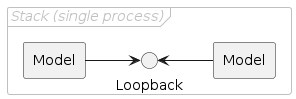
The loopback transport implements a limited SimBus algorithm which makes it possible to
run a model, or a stack of models, without connecting to a SimBus. Because the messaging
associated with connecting to a SimBus is removed (or internalised) by the loopback, this
is the fastest transport available when building simulations, however it is only
suitable for particular deployment scenarios and when developing models.
Note: The loopback transport is only suitable for stacked simulations (i.e. models are arranged within single process).
Configuration Parameters
| Parameter | Example |
|---|---|
transport (name) |
loopback |
uri |
loopback |
timeout (seconds) |
60 |
Stream (TCP/UDS)
@startuml transport-stream
skinparam nodesep 55
skinparam ranksep 40
skinparam componentStyle rectangle

component "Model" as m1
component "Model" as m2
component "SimBus" as sb
m1 <-left-> sb
m2 <-right-> sb

@enduml

The stream transport is a new development for connecting models in a simulation.
Models connect directly to the SimBus via TCP or UDS (Unix Domain Sockets). This
transport offers very low latency performance.
Configuration Parameters
| Parameter | Example |
|---|---|
transport (name) |
stream |
uri |
tcp://127.0.0.1, tcp://127.0.0.1:5001, unix:///tmp/simbus.sock |
timeout (seconds) |
60 |
Redis
@startuml transport-redis
skinparam nodesep 55
skinparam ranksep 40
skinparam componentStyle rectangle

component "Model" as m1
component "Model" as m2
component "SimBus" as sb
interface "Redis" as red
m1 -left-> red
m2 -right-> red
sb <-down-> red

@enduml
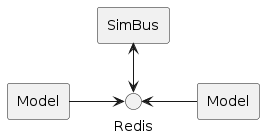
The redis transport is recommended for connecting models in a simulation. It uses blocking
Redis commands and simple data types to implement a message exchange mechanism.
Configuration Parameters
| Parameter | Example |
|---|---|
transport (name) |
redis |
uri |
redis://localhost:6379 |
timeout (seconds) |
60 |
Redis Async
@startuml transport-redisasync
skinparam nodesep 55
skinparam ranksep 40
skinparam componentStyle rectangle

component "Model" as m1
component "Model" as m2
component "SimBus" as sb
interface "Redis Async" as red
m1 -left-> red
m2 -right-> red
sb <-down-> red

@enduml
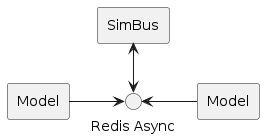
An experimental transport which uses and asynchronous Redis library. The performance was
slower than expected; its still fast, however the redis transport is faster; and development has stopped.
Configuration Parameters
| Parameter | Example |
|---|---|
transport (name) |
redis |
uri |
redisasync://localhost:6379 |
timeout (seconds) |
60 |
Redis PUB/SUB
@startuml transport-redispubsub
skinparam nodesep 55
skinparam ranksep 40
skinparam componentStyle rectangle

component "Model" as m1
component "Model" as m2
component "SimBus" as sb
interface "Redis PubSub" as red
m1 -left-> red
m2 -right-> red
sb <-down-> red

@enduml
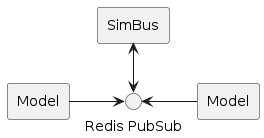
The redispubsub transport is the original, and reference, implementaion. Migration to the
newer redis transport is recommended.
Note: In some deployment scenarios, particularly clould environments, the
redispubsubtransport might not work. In such cases the newerredistransport will operate correctly.
Configuration Parameters
| Parameter | Example |
|---|---|
transport (name) |
redispubsub |
uri |
redis://localhost:6379 |
timeout (seconds) |
60 |